ImageSVG
Turn raster logos, icons, and illustrations into clean, editable SVG paths.
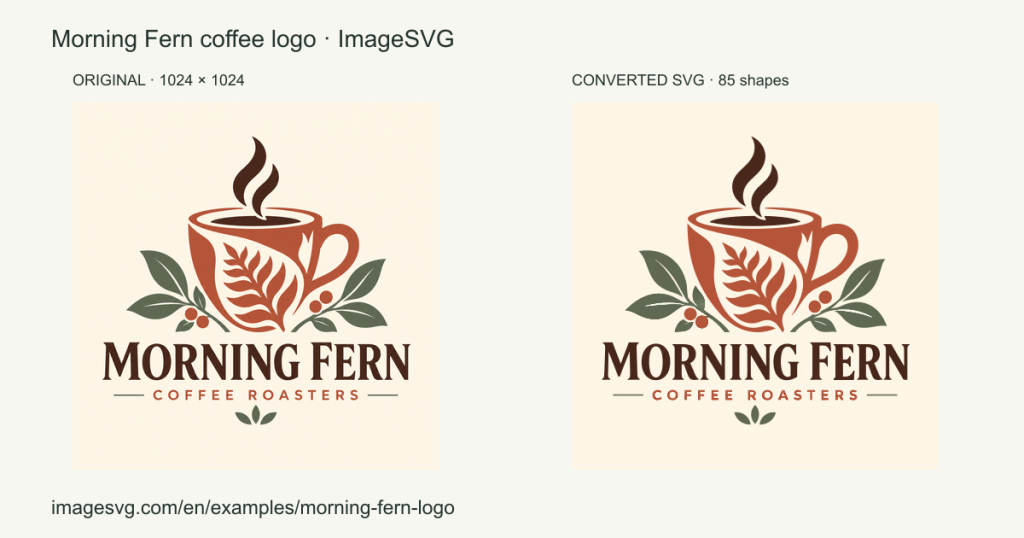
Designers often receive a logo or icon only as a PNG or JPG and need a version that stays sharp at larger sizes. ImageSVG turns that artwork into SVG shapes and offers a side-by-side view so you can check fine edges, holes, and small lettering before you download. The public examples show how the workflow handles a logo, an icon, and a line drawing.
PNG is a useful starting point when a logo includes transparency. If a JPG scan is the only available file, crop it to the artwork and use the clearest image you have. For printed materials, check the SVG at the final size before committing to a larger run.
ImageSVG is a released web app for designers, site owners, and people preparing artwork for print. Clear contours and distinct colors give the strongest starting point. Very small lettering and intricate textures can need review, and lettering from an image is traced as shapes. Registered users get a free conversion allowance. Paid plans offer additional capacity and export options. We would welcome feedback on what details people check first when comparing a logo with its SVG result.
CoderHype Score
A quick way to compare projects on CoderHype. Scores can change over time.
Log in to rate this project.
Is this your project?
If you made this project but it is linked to another CoderHype account, request an ownership review. We will verify your connection before changing the owner.
More projects to explore
Taste Stack
Installable creative direction for coding agents turning real software screens and prompts into launch videos.

3D-Agent brings text instructions into an editable Blender scene
An AI assistant for Blender with public demonstrations and a November subscription revenue snapshot.